Operate
How a session runs, in one paragraph, and where the full guide is.
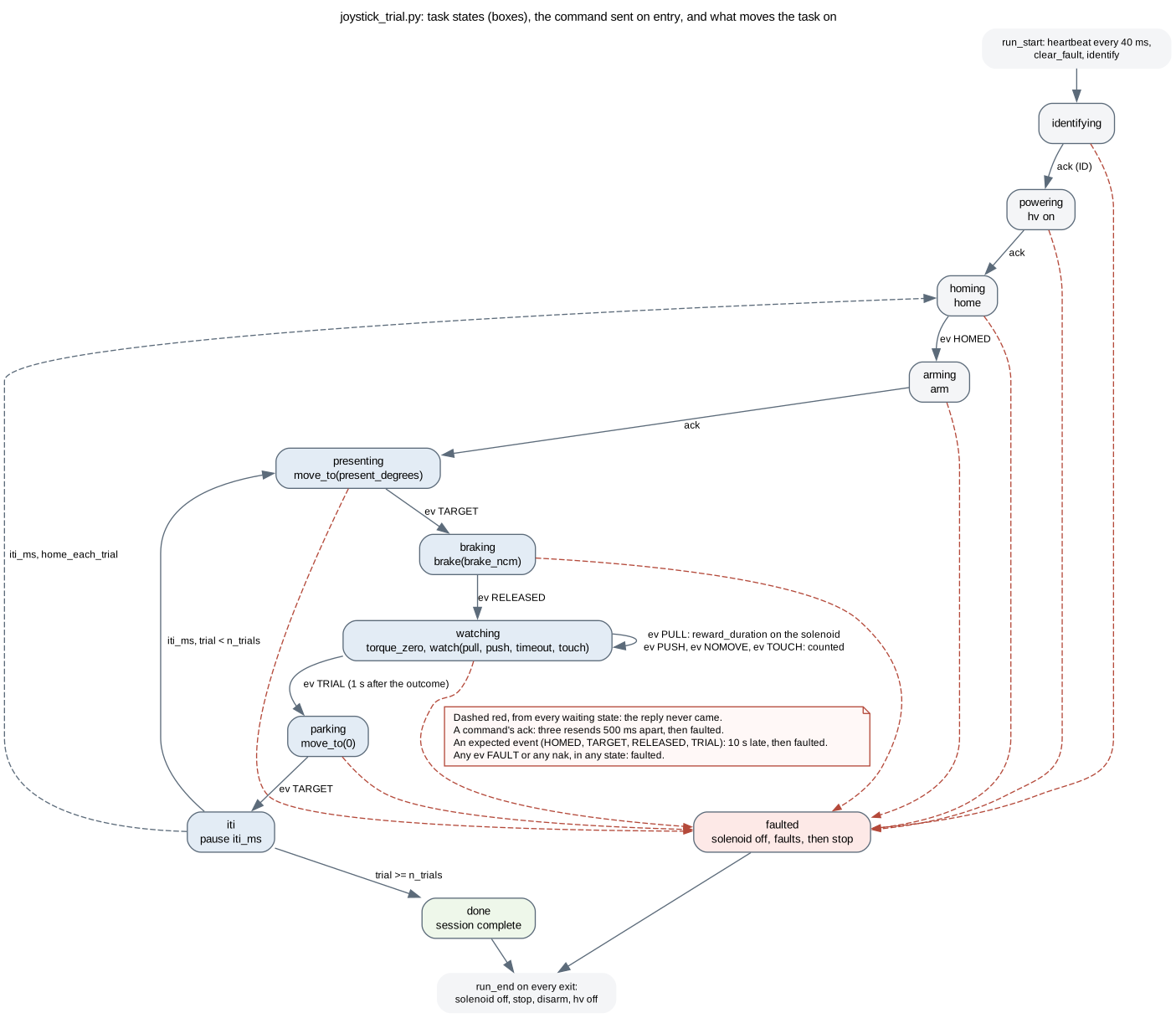
pyControl on the rig PC uploads the trial task to the controller; the task talks to one joystick board per session. Each trial: the joystick moves to the presented angle, the brake sets and the motor lets go, the torque reading is zeroed, the board watches for a pull or a push, a pull opens the reward solenoid, one second after the outcome the board sends its trial summary, the joystick parks, and after the pause the next trial starts. A fault, a refused command or a reply that never comes ends the session with the motor rail off.
Documents
- The researcher guide in the rig's repository: how to set up the pyControl GUI, the variables, what the log means, what to do when a joystick does not answer. The repository is private to the lab: notes/261007_mouse_joystick_researcher_guide.md.
- Glossary: the words the protocol, the task and the log use.
- Architecture: what runs where, from the rig PC to the parts of a station.
- The pyControl device class: the methods a task can call.
- The UART protocol: every verb, reply, event and fault code.
- Reprogramming a board and setting up a controller.